Changelog
Latest updates and announcements.
v0.1.3 (August 5, 2024)
The Tag and PIN inputs have been around since v0.0.9, but they never really had JavaScript behavior. Now that we have custom components, why not make them first-party components so you don’t have to resort to external libraries? And, if you did, just note that their class names have changed for consistency. So, if you’re using the following classes, here are the changes:
| Original | New |
|---|---|
.uk-tag-input | uk-input-tag |
.uk-pin-input | .uk-input-pin |
.uk-pin-separated | .uk-input-pin-separated |
Also, the class .uk-tag has had its background default background remove in favor of modifiers .uk-tag-primary, .uk-tag-secondary and .uk-tag-danger.
Other changes
- Better event dispatching on the Select component.
- Revival of Templates. Right now, we only have Laravel, Astro and HTML. These are very useful, so we can all start coding right away. If you maintain templates for your language and want to share them with the community, please feel free to share them (you can open an issue on Github or start a discussion or whatever) and I’d be happy to link them here in the docs.
v0.1.2 (August 2, 2024)
A lesson learned for all of us using Hooks.
As you probably know, our current “skin” (shadcn/ui) is essentially just a bunch of pre-configured hooks. If you’re not familiar with Hooks, it’s a way of saying, “Hey, override these rules.”
Who’s affected
People who are using v0.1.1 for the plugin and v0.0.4 for CDN.
Why the code was bad
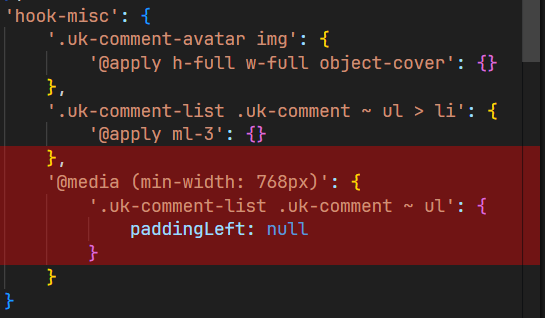
So the code above, essentially means, Find me the key of @media (min-width: 768px) and replace it with:
.uk-comment-list .uk-comment ~ ul: {
    paddingLeft: null
}
What it means is, I want to remove the paddingLeft created by UIkit. Although I’m forgetting one thing: media queries won’t nest the rules.
So, what happened was it replaced all rules under @media (min-width: 768px) with nothing. Because when you put null as value, we’re essentially deleting that rule.
The proper way
The proper way of removing the paddingLeft was just to target the rule, and call Tailwind CSS utility from there. So, in our case, there is a hook available called hook-list-sub and it will target .uk-comment-list .uk-comment ~ ul. So, it should have been:
'hook-list-sub': {
    '@apply ml-6 mt-6 border-l border-border md:pl-0': {}
}
Where we simply need to put md:pl-0.
Lesson learned
Do not mess with media queries. Instead, call responsive utilities, such as sm:*, md:*, lg:*, etc and let the Tailwind CSS or PostCSS do the rest.
v0.1.1 (July 26, 2024)
A couple of minor additions and fixes for this month.
- Introducing Glow component.
- Better keyboard navigation for Select component.
- Add
i18nattribute to Select component. - Revamped Comment component to better adhere to shadcn/ui design.
- Increased the default Accordion padding to
1rem. - Fixed the missing blue theme on CDN installation.
v0.1.0 (July 14, 2024)
DX-Focused Release
This version is all about reducing friction and helping you get started with your app as quickly as possible.
Breaking changes
1. Safelist Property Removal
The safelist property have been removed from presetQuick. If you’re using multiple presets, Tailwind CSS might ignore this property. To avoid issues, move the safelist to your own tailwind.config.js file.
 /** @type {import('tailwindcss').Config} */
 export default {
+  safelist: [
+    {
+      pattern: /^uk-/,
+    },
+  ],
 };
That’s it! The rest of the changes are optional, and you can continue with your existing setup. However, if you want to take advantage of the DX improvements, keep reading.
Optional changes
1. Simplify UIkit Imports
If you’re importing UIkit and its icons from NPM using the uikit package, you can remove that import. Franken UI now includes UIkit as a peerDependency. Instead, import UIkit from franken-ui in your app.js file.
npm remove uikit
- import UIkit from "uikit";
- import Icons from "uikit/dist/js/uikit-icons.js";
+ import { UIkit, Icons } from "franken-ui/uikit/js/dist";

 UIkit.use(Icons);

 window.UIkit = UIkit;
2. Streamline PostCSS Config
If you have postcss-sort-media-queries and postcss-combine-duplicated-selectors installed, you can remove them in your postcss.config.js file and import from franken-ui instead.
npm remove postcss-sort-media-queries postcss-combine-duplicated-selectors
 module.exports = {
      plugins: [
         require('tailwindcss'),
-        require('postcss-sort-media-queries')({
+ 		   require('franken-ui/postcss/sort-media-queries')({
             sort: 'mobile-first'
         }),
-        require('postcss-combine-duplicated-selectors')({
+		     require('franken-ui/postcss/combine-duplicated-selectors')({
             removeDuplicatedProperties: true
         })
      ]
 };
These changes are optional, and you can revert to your previous setup if you encounter any issues.
What’s new
- Introducing the
npx franken-ui initcommand! Learn more about it on our new installation page. - Added
onlyandexceptproperties forpresetQuick. Learn more about these on our new installation page. - Added
smallandxsmallsizes for button, icon and iconnav components, andsmallvariant for form input. Also, addedshadow-smfor icon component. - Added the highly requested combobox and custom select components.
v0.0.13 (June 8, 2024)
- Add support for theme generators or watch the demo on Mastodon on how to configure your own palette.
- Add Stepper component.
- Fix
.uk-listcolor modifiers. - Internal changes such as exposing the entire
shadcn-uipath instead of listing subpaths,hexes.jsnow exports function to convert HSL to hex instead of hardcoded hex. - Upgrade UIkit from
3.20.8to3.21.5.
v0.0.12 (May 20, 2024)
- Add Typography classes
- Fix
uk-dividerheight - Fix
uk-description-list-dividerwrong border color and hook - Remove dead classes in card component
- Refactor docs to use MDX for better maintenance, syntax highlighting, formatting and copying and pasting
- Refactor docs to have better examples that works for both as a standalone or as a Tailwind CSS plugin
- Fix modal width
- Fix missing hooks and components in
presetQuick() - Change default navbar gap to
gap-6
v0.0.11 (May 11, 2024)
- Introducing the CDN installation.
- Fix missing hooks and components in
presetQuick() - Add sensible padding for modal, table, tab components to make way for CDN aka “no-build” installations. If you are having trouble overriding some paddings, you can always use the not important utilities
!p-6or consider using hooks. - Change buttons’ shadow from
shadowtoshadow-sm - Add rounded corners on modal even on xs devices
- Fix notification alignment on xs devices
- Change UIkit breakpoints to match Tailwind CSS. Here are the list of changes:
| Screen | Original | New |
|---|---|---|
| SM | 640px | 640px |
| MD | 960px | 768px |
| LG | 1200px | 1024px |
| XL | 1600px | 1280px |
v0.0.10 (May 1, 2024)
- This release focus mainly on ease of use, code cleanup and introduction of
presetQuick() - Fix
uk-accordion-titlealignment - Fix
uk-tab-leftanduk-tab-rightwrong border color - Refactor
hooks.tsfor better maintenance - Demystifying hooks
v0.0.9 (April 30, 2024)
- Add tag and PIN inputs
- Increase default padding for
.uk-nav-primaryand.uk-nav-secondary - Fix height and line-height of
.uk-button-textand.uk-button-link